


Perfect Piano
4.225.10K Reviews
App Specs
- Version
- 7.9.9
- Updated On
- License
- Free
- Downloads
- 100,000,000+
- Developer
- Revontulet Soft
- Categories
- Music & Audio
- Platform
- Android, iOS
Screenshots
 Analysis by AppCompare
I judge a virtual piano less by how many sounds it can produce than by whether it makes me want to keep playing after a few minutes. Perfect Piano works best as a keyboard you can reach for whenever an idea or a spare moment appears: it turns a phone or tablet into a playable set of keys, with room to practise, experiment, and share. I see it as a handy musical sketchbook, not a full replacement for a physical piano.
A keyboard you can carry around
The central appeal is immediate access. There is no instrument to set up before trying a melody, and the on-screen keys make it possible to explore music in short bursts. That convenience changes how I use a piano app: rather than planning a formal practice session, I can try a phrase while waiting or work out a tune before I forget it. The touchscreen is naturally a different surface from piano keys, but it lowers the barrier to starting.
Revontulet Soft has developed the app as a free music-and-audio tool. It has an average rating of 4.2 from around one million ratings, and it has been installed over 100 million times. Those figures suggest it has reached a broad mix of casual players and learners, though popularity by itself does not make a phone keyboard feel like a real instrument.
One useful way to approach it is to decide what a session is for before opening the keyboard. If I want to remember a short musical idea, a compact layout is convenient; if I want to practise a passage, I benefit more from slowing down and concentrating on accurate taps. Treating it as a quick-access instrument rather than expecting a phone to behave like a piano keeps the experience enjoyable.
Using the keyboard for practice and play
So, let's dive right in. First things first, downloading Perfect Piano is smooth sailing. Available on both Android and iOS, it takes just a few taps to get it up and running. The app greets you with a sleek, user-friendly interface that makes you feel like a maestro right from the get-go.
Features That Hit the Right Note
Now, onto the features. What struck me immediately was the variety of instruments available. Yes, it's called Perfect "Piano," but it offers an array of other instruments like the organ, music box, and even a funky synth. Each instrument has its own unique sound, and switching between them is seamless.
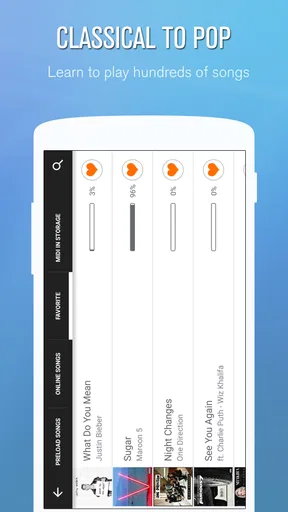
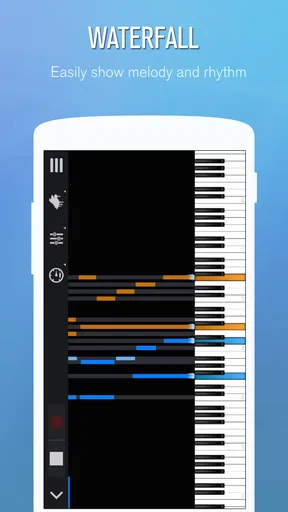
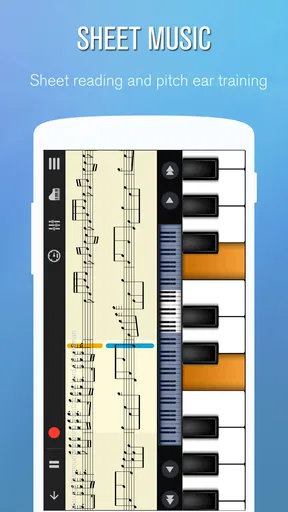
The app also caters to both beginners and seasoned players. There’s a handy learning mode that offers a step-by-step guide on playing popular tunes. I found this particularly useful as it breaks down complex pieces into manageable chunks. Plus, you can adjust the difficulty level as you improve.
Worth Reading Before You Choose

Baby Panda World Brings Quick Play to Modern Phones, but Its Game Library Feels Busy

ESPN’s Live Game View Makes Following Close Games Easier

QuizzLand Review: A Good Fit for Short Trivia Breaks, Not Every Player

Basketball Stars: Multiplayer Is Fast, but Can It Recover When Matches Go Wrong?

WEBTOON Turns Phone Updates Into a Better Reading Routine

Link to Windows Runs on Shared Habits, Not Social Feeds
A practical tip for the learning mode is to resist the urge to rush through a section just because it looks familiar. I get more from repeating a small passage until my hands can find the notes without constant correction, then increasing the challenge. On a touchscreen, that also gives me time to notice where my fingers land and whether I am repeatedly missing the same key. It is a useful way to build familiarity, even though it cannot teach the weight, reach, or physical technique of an acoustic keyboard.
Playing Around with the Keyboard
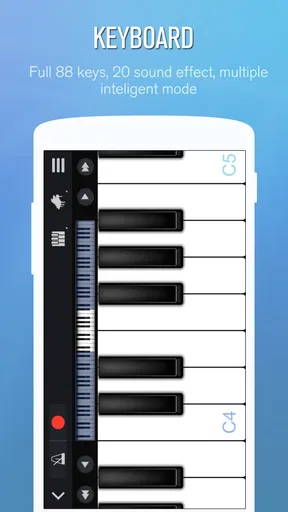
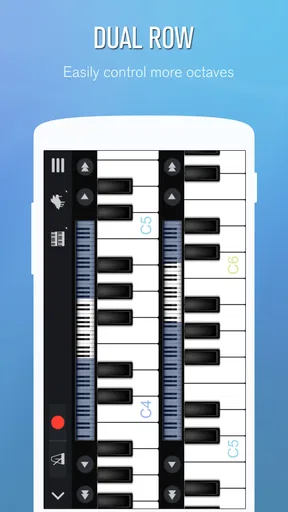
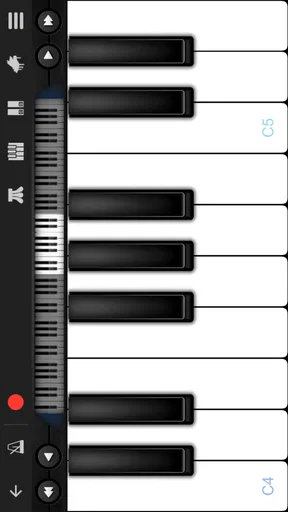
The keyboard itself is customizable, and you can switch between single and double-row modes depending on your preference. What’s impressive is how responsive the keys are – it genuinely feels like you're playing a real piano. I tried out a few scales and was surprised by the sensitivity and realism.
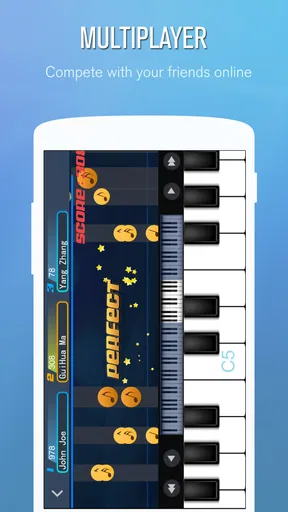
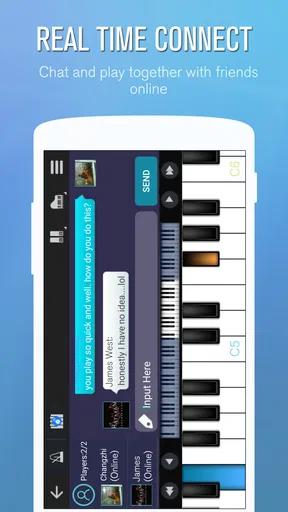
For those who like to jam with friends, the multiplayer mode is a real treat. You can connect with other users worldwide and even share your compositions. It's a fantastic way to showcase your skills or just have fun collaborating on a tune.
The choice between a single and double row is more than a cosmetic setting. I would start with the arrangement that keeps the notes I need visible and my hands comfortable, then change it when a piece demands a wider span. A layout that helps with a short melody may feel cramped for a passage using both hands, while a larger arrangement can make individual keys harder to tap accurately on a small phone. Trying both before settling into practice is a simple way to avoid blaming your timing on the music when the real issue is screen space.
Multiplayer is best treated as a social reason to play, rather than a substitute for structured lessons. It can make trying a tune less solitary and give a casual session a shared purpose. For a beginner who feels awkward practising alone, that can be motivating; for someone who needs detailed correction of posture, fingering, or rhythm, a teacher or a more formal course is the better fit.
Recording and Sharing Your Masterpieces
Recording your session is as simple as hitting the record button. Perfect Piano lets you save your pieces and share them with friends or on social media. It's great for tracking your progress or just showing off a bit!
I also appreciated the MIDI and external keyboard support. If you're serious about music production, this feature enables you to connect your device to other musical equipment, turning your smartphone into a powerful component of your music-making toolkit.
Recording can serve a more practical purpose than keeping a polished performance. I would use it to capture a melody before it slips away, then listen back and check whether the rhythm feels as steady as it did while playing. A recording also makes it easier to compare attempts over time. If the goal is a finished production with detailed editing and mixing, though, a dedicated music-making setup is a more appropriate tool; this app is more useful for quick capture and experimentation than for replacing a full studio workflow.
External keyboard and MIDI support make the app more flexible for people who already have compatible equipment. That creates a useful middle ground: you can explore its sounds and functions on a touchscreen, then use a physical keyboard when touch input becomes limiting. If you are buying an app specifically for a hardware setup, check that the connection method and your device work together before relying on it for a session. The feature is a welcome option, but it does not turn every phone into a complete production workstation.
Where it fits into an ordinary day
Picture having a few minutes free at home and remembering a melody from the day. I can open the keyboard, find the notes by ear, record a rough version, and return to it later rather than losing the idea. Another day, I might use a short learning-mode session to practise one difficult phrase, then stop once I can play it more consistently. These small, specific tasks suit a phone better than expecting it to support a long, uninterrupted practice routine.
For a new learner, the most helpful habit is to keep each visit focused: choose a short passage, practise it slowly, and record a take only when you want to hear how it is progressing. For someone who already plays, the app can be a convenient place to test a tune or pass time with another sound. In both cases, the screen is an advantage for access and a limitation for expressive, two-handed playing.
Choosing it over other music apps
Compared with a basic piano app that only puts notes on a screen, this one gives you several ways to play: selectable instrument sounds, different keyboard layouts, guided practice, recording, and a social mode. That breadth is useful if you want one app for casual exploration and a little structured learning. In contrast, a dedicated piano-learning service may suit you better if your priority is a carefully sequenced course, while a full digital audio workstation is the stronger choice for arranging and producing complete tracks.
A physical keyboard is still the better option when you need consistent key spacing, a more natural two-hand range, and the feel required for serious technique. Perfect Piano makes most sense as a companion to that instrument or as a low-commitment starting point, not as proof that a touchscreen can reproduce every part of playing piano. I would skip it if you specifically need realistic piano action or a professional recording environment.
Cost, access, and a few sensible expectations
The app is free to download, with in-app purchases ranging from about a dollar to six dollars per item. I would try the free experience first and only consider a purchase if I had already found a feature or use pattern worth paying for. Its content rating is Everyone, and the current version is 7.9.8; it requires Android 6.0 or later. Those details make it straightforward to judge basic compatibility and whether optional spending suits your plans.
The most important expectation to set is about touch input. A phone screen is small, and tapping keys cannot reproduce the resistance or physical feedback of a piano. A tablet can offer more room to work, but it is still a touch surface. If you often miss notes because keys feel cramped, try changing the keyboard layout before deciding the app is unsuitable; if precise physical technique is the goal, move to a real keyboard instead.
Who will get the most from it
I would recommend it to curious beginners who want an easy way to try melodies, casual players who enjoy switching between sounds, and piano owners who want a portable place to sketch ideas. The combination of guided practice and recording gives learners a way to work in small steps, while multiplayer adds a social option when playing alone loses its appeal. Its 4.2 average from around one million ratings reflects a widely used app, but the right choice still depends on whether your priority is convenience or instrument-level realism.
Someone seeking a complete curriculum, deep production controls, or the touch of weighted keys should look elsewhere or pair this app with more specialized tools. For everyone else, its strongest quality is how quickly it lets a musical thought become something you can play and hear. That is a modest promise, but a genuinely useful one for a free app.
Some Final Thoughts
Overall, Perfect Piano is a fantastic app for anyone interested in playing the piano or exploring other instruments. It's packed with features that cater to both novices and experts alike. The app's versatility ensures it's not just a one-trick pony – it offers a comprehensive, engaging, and interactive musical experience.
Whether you're looking to learn a new song, improve your skills, or just kill some time with a bit of musical fun, Perfect Piano is definitely worth a download. So, why not give it a try? Who knows, you might just discover your inner Beethoven!
Pros
- User-friendly interface for easy navigation.
- Wide range of songs to learn and play.
- Customizable keyboard layout options.
- Realistic sound quality enhances experience.
- Supports MIDI connections for versatility.
Cons
- Ads can interrupt the playing experience.
- Limited free features without in-app purchases.
- Occasional lag on older devices.
- Some songs require additional downloads.
- Graphics could be more visually appealing.
FAQs for Perfect Piano
What features does Perfect Piano offer for beginners?
Perfect Piano is ideal for beginners as it offers a comprehensive set of features like a built-in tutor, a variety of songs to practice, and adjustable learning modes. The app provides real-time feedback and interactive lessons that help users develop their piano skills at their own pace.
Is Perfect Piano compatible with external MIDI devices?
Yes, Perfect Piano supports external MIDI keyboards, enhancing the learning and playing experience. This feature allows users to connect their MIDI devices via USB or Bluetooth, enabling a more realistic piano experience and providing additional options for advanced practice and performances.
Can I use Perfect Piano without an internet connection?
Perfect Piano can be used offline, allowing you to practice and play without an internet connection. However, some features, such as downloading new songs or accessing community resources, require an internet connection to function properly. Offline use is perfect for uninterrupted practice sessions.
Does Perfect Piano include a music library for practice?
Yes, Perfect Piano includes an extensive music library featuring a wide range of genres, from classical to pop and jazz. Users can practice their favorite songs with adjustable difficulty levels, making it suitable for both beginners and advanced players. The library is regularly updated with new tracks.
Is Perfect Piano free to use, or does it have in-app purchases?
Perfect Piano is free to download and use, offering a selection of basic features. However, it also includes in-app purchases that unlock premium content, such as additional songs and advanced features. Users can choose to enhance their experience by purchasing these optional upgrades.


